Roo Code
This tool is no longer in active use. Observations from evaluation in 2025 and early 2026.
Overview
Roo Code is an AI coding assistant for VS Code that provides autonomous coding capabilities: file creation and editing, terminal command execution, and multi-step development tasks with visible planning.
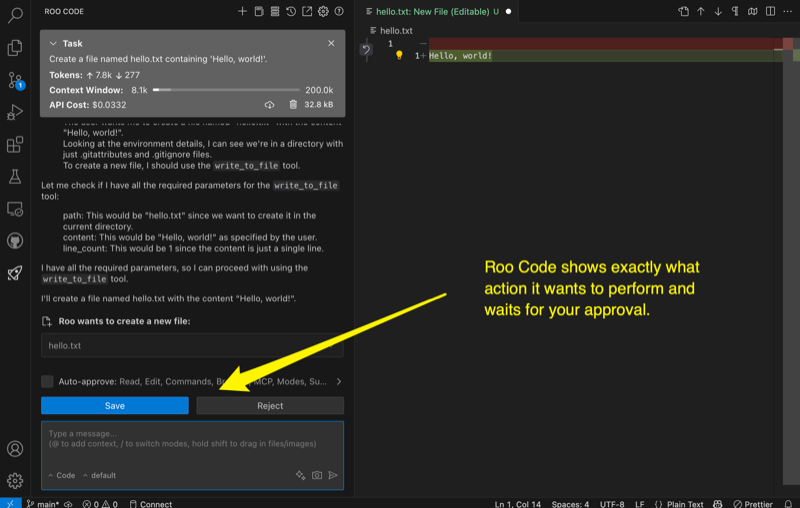
Review context
Strengths
- Autonomous task execution with visible multi-step planning, providing confidence in agent actions.
- Good VS Code integration with filesystem and terminal access.
- Supports multiple model providers for flexibility.
- Clear visibility into agent planning and execution before changes are applied.
- Active development with frequent feature updates.
Limitations
- Tied to VS Code. Not a standalone CLI solution for headless or remote use.
- Autonomous behavior can be unpredictable on complex or ambiguous tasks.
- Code quality varies with model choice and task complexity.
- Resource usage during indexing can impact editor performance on larger projects.
Where it fits
Roo Code is suitable for VS Code users seeking an autonomous agent for well-defined multi-step tasks within the editor. The planning visibility makes it appropriate for scenarios where reviewing agent intent before execution is important.
Current assessment
Roo Code shows promise for autonomous coding within VS Code, particularly for tasks where planning visibility matters. It has not reached the reliability of more mature CLI agents for complex or ambiguous work.
Reference
Revision history
2026-07 Rewritten.
2026-06 Published.